AI Resume Builder CV Maker PDF
- 4.5
- Rating
- 1.00M
- Installs
- Free
- Price
 Analysis by App-foxy
When I need a resume quickly, the hardest part is usually not writing the work history. It is deciding what to include, how to organize it, and how to turn rough notes into a document that looks ready to send. AI Resume Builder CV Maker PDF, created by SimpleEvo Apps, is built around that exact problem. It is a free business app for Android that uses AI to help shape a resume and then makes PDF sharing straightforward.
I found its appeal in the short path from an empty screen to a usable application document. It is not trying to replace careful career thinking, and it cannot make weak experience sound convincing by magic. What it does well is reduce the blank-page problem. If you already have your dates, roles, education, and skills somewhere, the app gives you a more practical place to turn those details into a structured resume.
The app has a 4.5 average from around 33 thousand ratings, with more than a million installs. That level of adoption makes it easier to see why it has become a familiar choice for people searching for an AI resume builder, although popularity should not be confused with a guarantee that every generated document will suit every profession.
You May Also Like

 Blood Strike: 2.5 Anniversary
Blood Strike’s Loadouts Turn Every Drop Into a Tactical Gamble
A close look at Blood Strike’s custom loadouts: how fast access to signature weapons reshapes its battle royale rhythm, rewards preparation, and narrows the gap between fights.

 Pandora - Music & Podcasts
Pandora’s Music Is Easy to Start, but Harder to Recover
Pandora’s strength is its low-effort path from a seed to a station. Its weak spot is how much confidence it asks you to place in connection, setup, and quiet recovery.

 8 Ball Pool
 Is Built on Rivalries, Rematches, and Routine
A close look at the rivalries, rematches, shared routines, and unanswered safety questions that turn a quick pool match into a persistent mobile community.

 Samsung Music
’s Quiet Strength Is Playing What You Already Own
Its reach comes less from spectacle than from dependable access to a personal library. That simplicity is both the app’s strongest retention engine and its ceiling.

 AccuWeather: Weather Radar
AccuWeather Review: A Quick, Clear Forecast for Everyday Decisions
For everyday plans, the best forecast is the one you can understand quickly. AccuWeather makes rain timing, radar, and local conditions easy to act on, with a few trade-offs.

 Hill Climb Racing
Why Hill Climb Racing Still Turns Crashes Into One More Run
A tiny car, a bumpy hill and one more upgrade: Hill Climb Racing keeps resurfacing because its simple chaos makes every near-miss feel personal.
More From Our News Desk



How the current version feels in everyday use
The current release is version 2.45, and the overall experience is aimed at speed rather than deep document design. I would describe it as a guided resume-making tool rather than a full word processor. That distinction matters: you open it because you want help producing a presentable CV, not because you want to manually control every line, margin, and visual element.
The most useful starting point is to gather your information before opening the editor. I recommend keeping a note with job titles, employer names, employment periods, education, certifications, software knowledge, languages, and two or three achievements for each important role. AI can improve wording, but it still needs accurate material. If you enter only “worked in sales,” the result may be polished while remaining too vague to help a hiring manager.
Once the basic information is available, the app’s value becomes clearer. It helps arrange the material into familiar resume sections and gives the content a more consistent voice. That is especially helpful when one part of your work history is written in short fragments and another part is written in long paragraphs. A consistent structure makes the document easier to scan, which is often more important than decorative design.
There is also a practical difference between creating a resume on a phone and editing one in a desktop office suite. A phone-based builder is convenient when your employment details are in messages, cloud notes, or photographs of old documents. You can work in small sessions instead of waiting until you have access to a computer. For someone applying during a commute, between shifts, or after a sudden job change, that convenience is a real advantage.
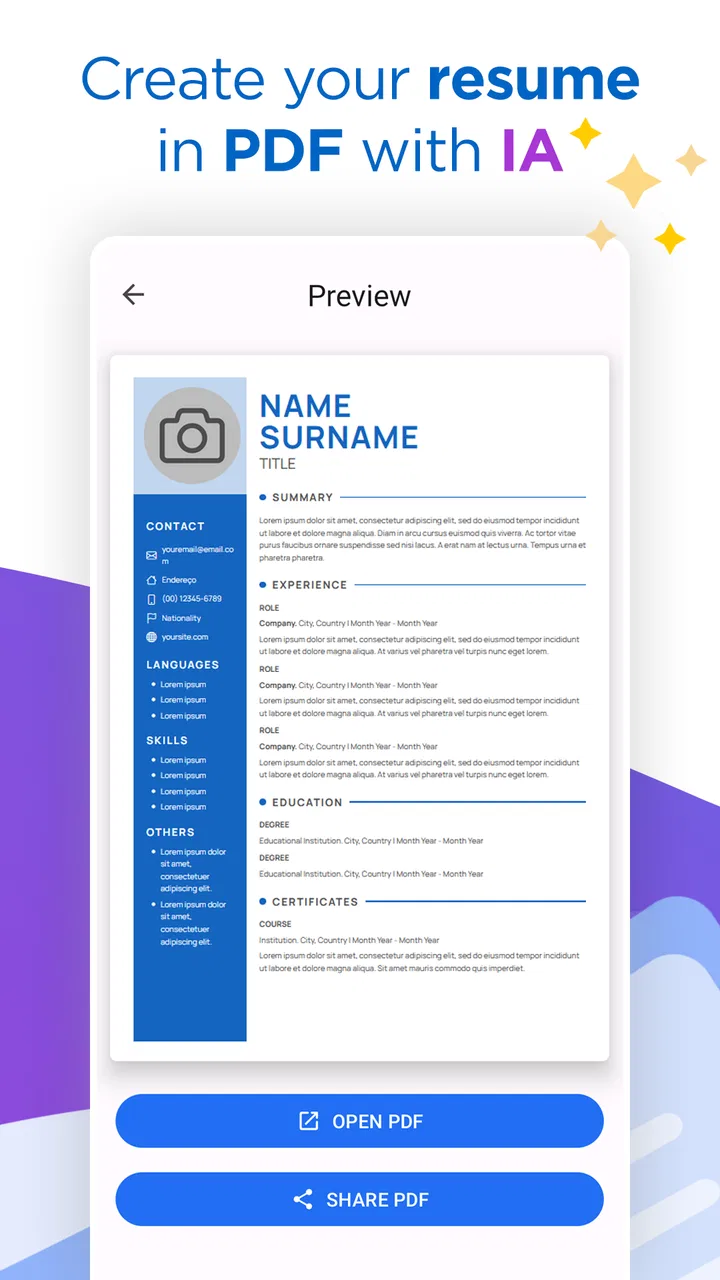
The PDF workflow is another strong point. Sharing a PDF avoids the layout surprises that can happen when an editable document is opened with a different office program. It also gives the recipient a stable version of the resume. I still suggest opening the exported file before sending it, checking page breaks, headings, dates, and contact details. A fast export is useful only if the final document is actually readable.
What the AI helps with, and what it cannot decide
The AI is most valuable as a drafting partner. I would use it to turn responsibilities into clearer bullet points, shorten repetitive wording, and suggest a more professional order for information. It can also help when you understand your work well but struggle to describe it in formal English. That makes the app particularly approachable for first-time applicants and people returning to employment after a long break.
However, I would not allow generated text to pass straight into a final application. AI-written resume language can become smooth but generic. Phrases about being “results-driven” or “highly motivated” do little unless they are supported by a specific task, result, tool, customer group, or responsibility. My preferred workflow is to accept the structure, keep only claims that are true, and replace broad adjectives with concrete evidence from my own experience.
A useful trick is to prepare two versions of the same achievement before entering it. In one, write the plain facts: what you did, for whom, with which tools, and what changed afterward. In the other, note the target job. The app can then help connect the facts to the role without forcing every application to use identical wording. This is a better use of AI than asking it to invent an impressive career story.
Another non-obvious benefit is that the app can act as a checklist for missing information. While reviewing a draft, I often notice that a role has a title and date but no explanation of the work, or that a skills section lists software without showing where it was used. The document becomes a prompt to fill those gaps. In that sense, the app is useful even before the final PDF is ready.
Changes and product maturity in the present release
The app was released on March 20, 2023, and its current version shows that it has moved beyond being a one-time template experiment. The important point for a user is not simply that a newer version exists, but that the product is being maintained as an active resume tool rather than left as an abandoned download. I would still judge the experience by the quality of the document it produces, yet ongoing version progress is a reassuring sign when storing personal career information in an app.
For someone who used an earlier release, the practical effect of continued development is likely to be a more settled workflow and fewer rough edges than a brand-new builder might have. I would not assume that every update changes the writing quality dramatically. Resume tools usually improve through small adjustments: clearer input steps, better handling of sections, smoother exporting, or refinements to generated wording. Those changes matter because they reduce friction without requiring users to relearn the whole process.
The minimum operating requirement is Android 6.0, which keeps the app accessible to people using older phones. That is helpful for job seekers who cannot justify replacing a device just to prepare applications. At the same time, older hardware can make editing long documents less comfortable, especially when switching between the app and notes or email. The low system requirement improves reach, but it does not turn a small phone screen into a desktop workspace.
I also appreciate that the app is free to start and marked for Everyone. That makes it easy to test the workflow before deciding whether it belongs in your regular job-search routine. There are in-app purchases ranging from $0.49 to $47.99 per item, so “free” should be understood as an entry point rather than a promise that every option is included without payment. Before investing time in a detailed resume, I would check which tools or designs are available in the version I plan to use.
Who benefits most from this resume workflow
This is a strong fit for students, recent graduates, career changers, and applicants who have never built a polished CV. Those users often need structure more than advanced formatting. The app can help them understand the expected shape of a resume, separate education from experience, and turn informal descriptions into something easier to review.
It is also useful for people who need several targeted versions. A customer-service application should not emphasize the same details as an administrative role, and a junior technology application may need a different skills order from a retail application. I would keep one complete master version outside the app, then use the builder to create focused copies. That protects the original information while making it easier to adapt the document for different vacancies.
Consider a realistic situation: I notice a suitable vacancy late in the evening, but my old CV is outdated and saved in an awkward format. I can collect the current job title, recent responsibilities, and relevant skills on my phone, use the AI assistance to tighten the wording, export a PDF, and review it before applying. The real advantage is not that the app removes all work. It is that the work becomes manageable in one sitting instead of turning into a long formatting project.
People returning to work may find the guided approach helpful as well. A gap in employment does not automatically need a defensive explanation, and the app cannot decide the best way to present it. What it can do is help organize volunteer work, training, freelance tasks, caregiving-related skills, or earlier experience into a coherent document. I would use the space to show current ability rather than trying to hide every pause in the timeline.
Where a desktop editor or another tool is better
I would hesitate to recommend this as the only tool for senior professionals with a complex career history. If your resume requires several carefully controlled versions, detailed project sections, publications, patents, international formatting, or strict brand guidelines, a desktop editor may offer more dependable control. A dedicated design tool can also be preferable when visual presentation is central to the profession, such as graphic design or art direction.
There is a similar limitation for applicants who need maximum control over automated screening systems. A clean, conventional document is usually safer than an elaborate layout, but the exact handling of columns, icons, tables, headers, and text order matters. I would inspect the PDF by selecting text or copying it into a plain note. If the content comes out in a confusing order, I would rebuild it in a simpler format before submitting it online.
The app is not the best choice for someone who already has a carefully maintained resume and only needs a minor edit. Importing or recreating an established document may take longer than changing one line manually. It is most valuable at the beginning of the process, when structure, wording, and presentation are all still unsettled.
Privacy-conscious users should also think carefully before entering sensitive information into any AI-assisted writing workflow. A resume naturally contains contact details and employment history. I would avoid adding unnecessary personal information, keep a copy of the source material in a secure location, and review the finished PDF before sharing it. These are sensible habits for any online resume service, not just this one.
Practical checks before sending the PDF
My first check is factual accuracy. AI can accidentally make a responsibility sound like an achievement, change the strength of a claim, or use a job title that is more impressive but not official. I compare every date, employer, qualification, tool, and result with my original notes. A polished false detail is still a damaging detail.
My second check is relevance. For each application, I remove skills that do not support the target role and move the strongest matching experience closer to the beginning. I also look for repeated verbs. If every bullet starts with “managed” or “responsible for,” the document feels flat even when the experience is good. Rewriting a few bullets in my own voice makes the result less mechanical.
My third check is the PDF itself. I read it at normal phone size, zoom in on contact information, and look at the final page rather than assuming the export preserved everything. I check whether a heading is stranded at the bottom of a page, whether a bullet has wrapped awkwardly, and whether the file name is professional. These small details are easy to overlook when the builder makes exporting feel instantaneous.
Finally, I send a test copy to myself and open it from the same kind of device I expect to use for the application. This catches problems that are invisible inside the editor. It also gives me a chance to read the resume as a recruiter might: quickly, without knowing the backstory, and looking for evidence that matches the vacancy.
My recommendation after using it
AI Resume Builder CV Maker PDF is a sensible choice when speed, guidance, and phone-based editing matter more than advanced layout control. Its combination of AI assistance and PDF sharing addresses the two most common obstacles for inexperienced applicants: not knowing how to phrase their experience and not knowing how to finish the document in a dependable format.
I would recommend trying the free version before paying for anything. The purchase range means the cost can vary depending on the option selected, so I would make that decision only after confirming that the available workflow genuinely improves the resume I need. The app’s Everyone rating also makes it approachable for a broad audience, but younger users should still focus on truthful, age-appropriate experience rather than trying to imitate a senior professional’s CV.
My main advice is to treat the AI as an editor, not as the author of your career history. Enter specific facts, keep the strongest evidence, remove inflated wording, and tailor the result to one role at a time. Used that way, the app can save meaningful effort without taking away your responsibility for the final document.
SimpleEvo Apps has made a practical tool for the urgent, everyday resume task: starting from scattered information and ending with a shareable PDF. It is not a replacement for a desktop publishing program, a career coach, or careful proofreading. For students, career changers, and anyone facing a blank resume on a phone, though, the biggest strength is the guided path from rough notes to a document you can actually review and send.
What I would watch in future releases is not more decoration, but better control over tailored versions, clearer editing of AI suggestions, and export behavior that remains dependable across different resume lengths. Those improvements would make an already convenient tool more useful for experienced applicants as well as beginners. For now, I see it as a good starting point and a practical emergency option, provided I always give the final PDF a careful human review.
FAQs for AI Resume Builder CV Maker PDF
01What is AI Resume Builder CV Maker PDF?
AI Resume Builder CV Maker PDF is an application designed to help users create professional resumes and CVs with less effort. It typically provides editable templates, guided sections, formatting tools, and AI-assisted suggestions for writing summaries, work experience, skills, and other content. After completing the resume, users can usually export it as a PDF for applications, email, or online job platforms.
02Can the app create a resume automatically using artificial intelligence?
The app can assist with resume writing by generating or improving sections based on the information you provide, such as your job title, experience, education, and skills. However, the results should be reviewed carefully before sending the document to an employer. AI-generated text may sound generic or include inaccurate details, so personalizing the wording and checking every date, qualification, and responsibility is important.
03Can I export my CV as a PDF and share it with employers?
Yes, PDF export is one of the main purposes of AI Resume Builder CV Maker PDF. Once your resume is completed, you can generally save it in a professional PDF format and share it through email, messaging apps, cloud storage, or job websites. Before exporting, check the page layout, spacing, contact information, and whether the selected template is easy for recruitment software to read.
04Is AI Resume Builder CV Maker PDF free to use?
The application may offer free resume-building tools, templates, or a limited number of exports, while additional designs, AI features, or unlimited downloads may require a subscription or one-time purchase. Availability can vary depending on the device and current app version. Before starting, review the pricing page, trial conditions, renewal terms, and cancellation policy to avoid unexpected charges.
05Is my personal information safe when using the app?
Creating a resume requires entering personal information such as your name, email address, employment history, education, and sometimes an address or phone number. Before using the app, read its privacy policy to understand how this data is stored, processed, and shared. Avoid adding sensitive information that is not necessary, and only upload documents or photos when you are comfortable with the app’s permissions.
Pros
- Creates polished resumes quickly with AI-assisted writing suggestions.
- Offers professional templates suitable for different industries and career levels.
- Exports resumes as PDF for easy sharing with employers and recruiters.
- Helps improve wording for work experience
- skills
- and professional summaries.
- User-friendly interface makes resume creation accessible to beginners.
Cons
- AI-generated text may sound generic and require personal editing.
- Some templates or advanced tools may require a paid subscription.
- Customization options can be limited compared with desktop resume software.
- Uploading personal career information may raise privacy concerns.
- PDF formatting may need checking before submitting to employers.

AI Resume Builder CV Maker PDF
Gallery